
Health / Damage
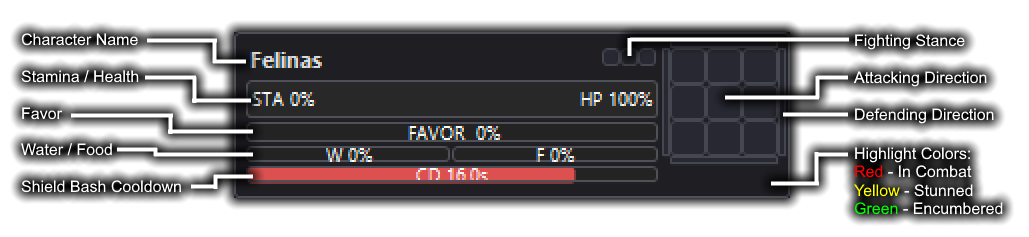
Live health to the last percent. WurmShare highlights party members who are currently or recently in combat, stunned, or encumbered.
A WurmMaps.XYZ Project · v1.0.4
A lightweight overlay that broadcasts your Health, Stamina, Food, Water, Favor, Shield Bash Cooldown, Aim / Shelter Direction, Fighting Stance, and more - displaying your entire team in real time, so no comrade falls unseen.
Feature Complete
WurmShare reads your game logs, and small parts of the screen, to track the state of your character.
Live health to the last percent. WurmShare highlights party members who are currently or recently in combat, stunned, or encumbered.
The breath behind every sprint, dodge, and parry. Know who has the wind to hold the line, and who might straggle behind.
Track the slow burn of every buffed meal. Get forewarning when a special move depletes an ally's food and leaves them vulnerable.
Thirst is the number one killer of Wurmians. Monitor your entire team's hydration levels at-a-glance.
Track the favor burn of your priests in battle. Time and coordinate your spell casts and favor regeneration.
Shield Bashes win fights. Time your bash sequences accurately to ensure you never give the enemy a gap to recover.
Party Members
The same in-game layout you're already familiar with - compactified, and miniaturized.
Instant Plug-And-Play
No accounts, no servers of your own, no editing of the game's sacred files.
Drop WurmShare anywhere and run it. Point it to your Wurm install directory, type in your character name, and your group's password.
Drag the capture box over your in-game health and sustenance bars, positioning them as accurately as you can.
Simply click "Join" to begin broadcasting your vitals to the rest of your team.
Supreme Quality-of-Life
Full support for multi-monitor setups with variable scaling and DPI settings.
Settings are saved when closing the settings panel. Window and Capture locations are save for next start-up.
Choose how many rows and columns are displayed. Drag the overlay anywhere, and adjust it to any size.
Automatically retrieve updates from GitHub when available.
All communications are encrypted with the password you choose - which is never shared with the server.
Under 30 MB at rest and a single idle thread. Minimal-to-No Performance Cost.
Full code is available for you to host your own communication server. No trust required.
The moment a comrade drops, the ledger cries their name and last-known place so the rescue rides true.
Beneath the Hood
No memory editing. No injection. No automation. Just careful reading of what your own client already shows you.
WurmShare is a small, self-contained desktop companion. It watches two things your game already produces — the log files it writes to disk, and a region of the screen you point it at — turns them into a handful of numbers, seals those numbers with your group's password, and relays them to your party. Here is the full journey of a single heartbeat.
WurmShare reads the same _Event and _Combat log files the Wurm client already writes to your players/<name>/logs folder, tailing them line-by-line as new entries appear. These logs are how the app learns about discrete events — entering and leaving combat, stuns, shield bashes, spell casts, stance changes, and the like.
Continuous bars — Health, Stamina, Food, Water, and Favor — are not written to the logs, so for those WurmShare captures a small rectangle of your own screen that you position over the in-game status bars during setup.
Log lines are matched against a library of patterns to produce structured events with timestamps; a shield bash line, for instance, starts a cooldown timer that counts down locally. Captured bar regions are reduced to a simple fill percentage by walking each bar's pixels and finding where the "filled" color gives way to the "empty" background. Everything is normalized into a tidy state object — a few small numbers and flags describing exactly one character at one moment.
Before anything leaves your machine, your state object is encrypted. WurmShare derives a key from the group password you and your party agree on, using a standard key-derivation function, then encrypts each update with authenticated AES-GCM. The password itself is never transmitted and never stored on the relay — only your party, who know the same password, can derive the key needed to read your data.
The encrypted blob is sent over a persistent WebSocket connection to a lightweight relay server. The relay is deliberately dumb: it groups connections by an opaque room identifier and forwards ciphertext between them. It cannot read a single value you send.
Every other party member's WurmShare receives that ciphertext, decrypts it with the shared key, and merges it into a local model of the whole group. That model is what you see: a compact, familiar overlay you can drag, resize, recolor, and arrange into rows and columns. The round trip — observe, seal, relay, render — typically completes in well under a tenth of a second, so the panel feels live.
The entire pipeline runs in a single idle background thread and a borderless overlay window. When you close WurmShare, it stops reading and broadcasting immediately; nothing persists on the relay.
WurmShare is a passive, read-only companion. It is built to respect the game — but you are responsible for how you use it.
It never modifies the game. WurmShare does not read or write the Wurm client's memory, does not inject code, does not send keystrokes or mouse input, and does not alter any game file. It only observes log files the client itself produces and a region of your own screen, and it only ever displays information that is already visible to you.
Rules and Terms of Service are your responsibility. Third-party tools and what counts as a permitted "overlay" can change at the discretion of the developers and staff of Wurm Online. WurmShare does not automate play or make decisions for you, but WurmMaps.XYZ cannot and does not guarantee that its use is permitted under the current rules. If you are unsure, ask the game's staff before using it, and stop immediately if asked to. You alone accept any risk to your account.
Readings are estimates, not gospel. Values derived from screen capture can occasionally misread due to UI scaling, custom themes, overlapping windows, particle effects, or unusual lighting. Treat displayed stats as a close approximation and never rely on a single reading for a critical decision.
Share your password wisely. Anyone with your group password can read everything your party broadcasts. Use a unique password, share it only with people you trust, and change it if a member should no longer have access.
No warranty. WurmShare is provided "as is," without warranty of any kind, express or implied. To the fullest extent permitted by law, the authors accept no liability for any loss, damage, or account action arising from its use. It is not affiliated with, endorsed by, or sponsored by Wurm Online, Code Club AB, Game Chest Group, or GameThrill AB.
Common Counsel
The questions every sensible player has.
To be direct; We don't know, and no one ever truly can. Wurm Online's rules are subject not just to change, but also to widely varying interpretations from different Game Masters.
WurmShare is designed to stay firmly and fully within the rules as they are outlined: it is read-only, never touches the game client's memory or files, does not automate any action, nor send any kind of inputs — it only shows you information you can already see on your own screen.
That said, third-party tools and overlays are ultimately governed by Wurm Online's Rules and Terms of Service, which can change at their discretion. We cannot guarantee permissibility on your behalf. If you have any doubt, ask the game's staff before using it. See A Word of Caution above for the full picture.
Two ways, both entirely external. Discrete events (combat, stuns, shield bashes, spell casts, stance changes) come from the log files the client already writes to disk, which WurmShare simply tails.
Character states like Health, Stamina, Food, Water, and Favor aren't logged, so WurmShare reads a small region of your own screen that you position over the status bars during setup, and measures how full each bar is. Nothing is injected and no game file is altered.
Screen-Captures are performed based on a full-screen overlay that is created - it is not interacting with Wurm to achieve this. WurmShare does NOT interact with the Wurm Online client in any way, shape, or form.
No. Every update is encrypted on your machine with a key derived from your group password using authenticated AES-GCM. The password itself is never sent to the relay or stored anywhere off your device.
The relay server only ever sees encrypted blobs and forwards them to your party — it cannot read a single value. Only people who know the same password can decrypt your data, so choose a unique one and share it only with trusted members.
Yes. Each member runs their own copy and joins the same group using the shared password. You'll see live data for everyone who is running WurmShare and connected — and they'll see yours. Anyone not running it simply won't appear on the overlay.
It's built to be a featherweight: under 30 MB of RAM at rest, running on a single idle background thread and a borderless overlay window. In practice the performance cost is minimal to none, even on older machines.
Yes. WurmShare supports multi-monitor setups with variable scaling and DPI settings, and it remembers your window and capture-box positions between sessions, so you only need to set things up once.
Yes to both. The full source is available on GitHub, and the relay is intentionally simple so you can host your own if you'd rather not use the public one. Because all traffic through the relay is encrypted end-to-end, no trust in the server operator is required either way.
Free and open-source — forever
Windows 7/10/11 · 64-bit · 30 MB RAM